
Content from How to evaluate a run
Last updated on 2026-10-28 | Edit this page
Estimated time: 20 minutes
Overview
Questions
- What do you do after a run finishes, and what do you do with that answer?
- Which line of
time -pis the time you waited?
Objectives
- Name the three steps in the life cycle of an HPC application.
- Time one short command with
time -pand readreal.
The life cycle
An HPC application is software written to use a supercomputer or a cluster on a hard problem. It does three kinds of work: intensive computation, communication between parallel processes, and input and output on a fast file system.
The life cycle is a loop with three steps.
- Run the application.
- Evaluate the performance.
- Make changes to the application.
Then you run it again. A change you have not timed is a guess.
What “evaluate” can mean
The deck lists several ways to evaluate a run:
- Tools such as Score-P, Scalasca, Nsight Systems, and AMD uProf.
- The execution time.
- The memory footprint.
- The network load.
- A comparison with a similar application or model.
- A comparison on different hardware.
- A guess you have not measured.
This episode uses the second one. You time one short command and write down a single number. Later episodes compare that kind of number. They do not replace this first step.
time -p
time -p is the POSIX form. It prints three lines on
standard error.
-
realis the elapsed time, the seconds you waited. That is the wall-clock time. -
userandsysare CPU time. Added together they can be larger thanrealwhen several cores run at once. They can be near zero when the process is waiting.
real is the wall-clock time. For sleep 1 it
is about 1 second. user and sys are near zero
because the process spent the second waiting, not computing. Write the
real line down. That is the whole measurement this episode
asks for: one short timed run, one number.
- The life cycle is run, evaluate, change, and run again.
-
time -pprintsreal,user, andsys. -
realis the wall-clock seconds you waited. - Start with one short timed run before you reach for a profiler.
Content from What limits a run
Last updated on 2026-10-28 | Edit this page
Estimated time: 30 minutes
Overview
Questions
- How do you tell an I/O limit, a communication limit, a compute limit, and a memory limit apart?
- Which change matches which limit?
Objectives
- Separate I/O, communication, computation, and memory footprint using the distinctions in the deck.
- Match one symptom to each limit.
An application has more than one level, and each level can dominate the time. The deck asks you to look at four of them on their own: I/O, communications, computations, and memory footprint.
I/O
A parallel file system and a sequential file system do not move bytes the same way. You can measure read and write speed. The data can be ASCII or binary. Some file formats are sequential and some are parallel. The simplest evaluation is the elapsed time of the I/O itself.
The deck’s table is a 10 million element vector of 64-bit floating-point values on an NVMe file system. Speeds are MB/s.
| Format | Operation | MB/s |
|---|---|---|
| ASCII | Read | 29.7 |
| ASCII | Write | 24.9 |
| Binary | Read | 2666.4 |
| Binary | Write | 1586.5 |
2666.4 / 29.7 is nearly 90, so the binary read in that
table moves the same vector much faster. If the elapsed time of the run
is the elapsed time of that read, the limit is I/O, and the format is
part of the cause.
Communication
Communication gets more expensive as the number of active processes grows, so speedup falls away from the ideal line. The cost depends on message size, on the topology of the network, and on synchronization. Changing it can require knowing that network. Some MPI libraries let you tune the algorithm at run time.
A communication-limited run is one where adding processes moves you further from ideal speedup, and the extra time tracks messages and waits.
Computation
Ideal speedup, at fixed total work, is P when you use P processors. Dozens of tools measure sequential and parallel codes. Threaded codes, distributed codes, and GPU codes need different tools. Many of those tools read hardware counters. On Snellius the counters have to be turned on for the job. The roofline episode has the lines. The course cluster uses a different counter tool. The roofline tab holds that split.
A compute-limited run is one that approaches that ideal speedup, with the cores doing the arithmetic.
Memory
The memory footprint is how much RAM the application holds. A large footprint can cause cache misses, and those misses show up as time. The footprint can also decide how large a node you must ask for. The deck’s commands are:
A memory-limited run is one that needs a bigger node because of RAM, or one whose time is cache misses.
Changes, after you know the limit
The deck’s list of changes is the third step of the life cycle. Pick from the limit you found.
- A faster model or method, or a faster library for the same method.
- Lower precision, from 64-bit floating point to 32-bit.
- A different data layout, from an array of structures to a structure of arrays.
- Less I/O, or a format that matches the measurement above.
- Less data movement, in cache or on the network.
- Code that knows the hardware, or different hardware.
- A smaller memory footprint.
- A different programming language.
Which limit is it?
Each note is one run. Name the limit: I/O, communication, compute, or memory.
- A 10 million element vector of 64-bit values is read as ASCII at 29.7 MB/s and as binary at 2666.4 MB/s. The elapsed time of the run is the elapsed time of the read.
- From 1 node to 32 nodes, speedup falls away from the ideal line. The extra time tracks message size, topology, and synchronization.
- The total work stays fixed. On P processors the speedup is close to P, and the cores are doing the arithmetic.
- The job only runs after you move it to a node with more RAM.
valgrind --tool=massifshows a large footprint, and the time is cache misses.
- I/O. The deck separates this limit by the elapsed time of the read or write, and by format. ASCII and binary on the same vector differ by the speeds in the table. A parallel format is the other lever the deck names.
- Communication. The deck says this cost grows as more processes take part, and that it depends on message size, topology, and synchronization. The ideal-versus-real speedup curve is the picture of that gap.
- Compute. The deck’s ideal, at fixed total work, is a speedup of P on P processors. Counter tools are how you confirm the cores are doing that arithmetic. They are not themselves the limit.
- Memory. The footprint is how much RAM the run holds. The deck says
it can cause cache misses and can force you onto a larger node.
massifis the measurement named for that footprint.
- Look at I/O, communication, computation, and memory footprint separately.
- I/O: time the read and the write. On the deck’s NVMe table, binary read is 2666.4 MB/s and ASCII read is 29.7 MB/s.
- Communication: speedup falls away from ideal as processes are added. Cost depends on message size, topology, and synchronization.
- Compute: at fixed total work the ideal speedup is P on P processors.
- Memory: the footprint can cause cache misses and can force a larger
node.
valgrind --tool=massifmeasures it.
Content from Strong and weak scaling
Last updated on 2026-10-28 | Edit this page
Estimated time: 35 minutes
Overview
Questions
- What stays fixed in strong scaling, and what grows in weak scaling?
- How do you get an efficiency of 0.625 from 8.0 seconds and 1.6 seconds?
Objectives
- Define strong scaling, weak scaling, speedup, and efficiency.
- Compute the worked 8-core efficiency 0.625.
- Design a strong AXPY series and a weak AXPY series without copying
axpy.c.
Two definitions
Strong scaling keeps the problem size fixed and increases the number
of processors. The hope is that the same work finishes sooner. Amdahl’s
law says the serial share caps that hope. If s is the
fraction of the time that stays serial, p is the parallel
share, and N is the number of processes, then:
speedup = 1 / (s + p/N)Weak scaling increases the problem size with the number of processes. Each process keeps about the same amount of work. Gustafson’s law says the parallel part grows with the resources and the serial part stays fixed as the problem grows:
speedup = s + p*NIn both laws, s is the serial share of the time and
p is the parallel share. N is the number of
processes.
Measured speedup and efficiency use the times you record.
T_s is the serial time. T_N is the time on N
processes.
speedup = T_s / T_N
efficiency = T_s / (N * T_N)
An efficiency of 1 would mean every added process carried a full share of the time. Communication, startup, and the serial share pull the number down.
A worked efficiency
This table is a worked strong-scaling series from the timing material in this course. The problem size stays fixed. The efficiencies are 1.000, 0.909, 0.800, and 0.625. The series is a worked example. Record AXPY on its own.
| Cores | Seconds | Speedup | Efficiency |
|---|---|---|---|
| 1 | 8.0 | 1.000 | 1.000 |
| 2 | 4.4 | 1.818 | 0.909 |
| 4 | 2.5 | 3.200 | 0.800 |
| 8 | 1.6 | 5.000 | 0.625 |
Eight cores finish in 1.6 seconds. One core takes 8.0 seconds. The
speedup is 8.0 / 1.6 = 5. The efficiency is
8.0 / (8 * 1.6) = 8.0 / 12.8 = 0.625. The extra cores
helped, and they helped less than the first ones.
AXPY, strong and weak
The binary is the hybrid AXPY in the hybrid MPI and OpenMP lesson: https://supersurf.rgoswami.me/hybrid-jobs/. The source
there is episodes/files/hands-on/ex2/axpy-hybrid.c, built
by submit-axpy-hybrid.sh as axpy-hybrid.out.
Do not paste a second copy of that program here.
AXPY is y = a * x + y on a vector of length
n. The hybrid program splits n across tasks.
It is pointwise and limited by memory bandwidth.
Strong scaling: keep n fixed and run 1, 2, 4, and 8
tasks. You are asking the same bytes to finish sooner.
Weak scaling: multiply n by the task count, so each
task’s local length stays about the same. One task at length
n, two tasks at length 2n, four at
4n, eight at 8n.
Weak scaling stays flatter. Each task still moves about the same number of bytes, so the time stays nearer the one-task time. Strong scaling of this kernel drops and then flattens, because the bytes still have to move and the memory path fills up. This episode does not include a measured AXPY table. The shape is the point. The hybrid lesson is where you record the times.
A two-core node cannot hold eight tasks at one core each. Pass a
smaller request on the sbatch command line. The tab says
how, and it says to check sinfo first.
On a two-core node, pass the smaller request on the command line. Do not edit the script.
BASH
sbatch --cpus-per-task=2 pi.sh
sbatch --array=0-99%10 array_job.sh
QCG_MAX_INPUTS=100 sbatch --ntasks=2 qcg_job.sh
iend=8 wdir=TMPDIR sbatch run.sh
Check the core count with sinfo first.
Efficiency, then two AXPY plans
The table says 8.0 seconds on 1 core and 2.5 seconds on 4 cores. What
is 8.0 / (4 * 2.5)?
Then write two command plans for the hybrid AXPY, using task counts
1, 2, 4, and 8. In the strong plan, what happens to n? In
the weak plan, what happens to n? Which series should stay
flatter, and why?
8.0 / (4 * 2.5) = 8.0 / 10 = 0.8. The table rounds that
efficiency to 0.800. The speedup on that row is
8.0 / 2.5 = 3.2.
Strong plan: one fixed n, and --ntasks of
1, then 2, then 4, then 8, with one core per task. The global vector
does not change.
Weak plan: the same task counts, and n scaled by the
task count. If the one-task length is n, the eight-task
length is 8n. Each task’s local length stays near
n.
The weak series stays flatter. AXPY’s time follows the bytes each task moves. Strong scaling keeps the global bytes fixed and splits them, until bandwidth stops the split from helping. Weak scaling gives each task a similar vector, so the time stays nearer the one-task time.
On a two-core node, 4 and 8 tasks do not fit on one node. The tab is
the rule for passing a smaller request. Check sinfo before
you copy a core count. The 0.625 row is the worked table above. Your
AXPY times are a separate measurement.
- Strong scaling fixes the problem size. Weak scaling grows it with the processes.
- Amdahl:
1 / (s + p/N). Gustafson:s + p*N. - Speedup is
T_s / T_N. Efficiency isT_s / (N * T_N). -
8.0 / (8 * 1.6) = 0.625on the worked 8-core row. - For AXPY, fixed
nat 1, 2, 4, and 8 tasks is strong scaling.nscaled by the task count is weak scaling, and that series stays flatter.
Content from The roofline
Last updated on 2026-10-28 | Edit this page
Estimated time: 45 minutes
Overview
Questions
- What is arithmetic intensity, and what is the ridge?
- How does the deck turn throughput 6.7257 and bandwidth 2.6767 into 2.5 FLOP/byte?
Objectives
- Place a kernel on the memory side or the compute side of the ridge.
- Count FLOPs for an add, a multiply, and a dense matrix product.
- Read the deck’s uProf example as 2.5 FLOP/byte, and use the counter tab for your machine.
Two roofs
A roofline plots how fast a kernel runs against how much arithmetic it does per byte it moves. The vertical axis is performance, in GFLOPS. The horizontal axis is arithmetic intensity, in FLOP/byte.
The sloping roof is memory bandwidth. The flat roof is peak performance. They meet at the ridge point. Left of the ridge the kernel is memory-bound: it waits on bytes. Right of the ridge it is compute-bound: it waits on the arithmetic peak. The picture shows which optimisation to do first. A memory-bound kernel speeds up when it moves fewer bytes, or when the machine moves bytes faster. A higher arithmetic peak sits on the other side of the ridge.
Double precision and single precision can be two flat roofs. The higher one is the single-precision peak. The lower one is the double-precision peak.
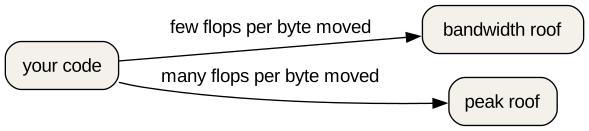
The figure’s bandwidth roof is the sloping side. The peak roof is the flat side. Your kernel is a point underneath one of them. The ridge is the corner where the two roofs meet. The figure has no numeric intensity for that corner. Compare a measured intensity with the ridge of the machine you measured.
Counting FLOPs
An addition is 1 FLOP. A multiplication is 1 FLOP. One add and one
multiply on each of N elements is 2N FLOP.
If you know the algorithm, you can use its complexity. A generic
dense matrix-matrix product is about O(N^3) FLOP. The
matching total for the usual inner step, one multiply and one add, is
about 2 N^3 FLOP. An FFT is about O(N log2(N))
FLOP. The big-O form often leaves out the total count.
O(N^3) says how the count grows. 2 N^3 is a
count.
A large code base is a poor place to do this by hand. The deck’s answer is to use a performance tool. The reference page lists the tools from the deck. For a roofline, the ones that read counters are PAPI, likwid, and uProf. Score-P and Scalasca are the MPI and OpenMP analysis path named alongside them.
The deck’s uProf example
On Snellius the deck loads uProf and asks it for a roofline. The
course cluster does not use this command. The tab below is the split:
uProf on Snellius, perf and PAPI on the course cluster.
BASH
module purge
module load 2025
module load AMD-uProf/5.1.701
AMDuProfPcm roofline -X -o res.csv -- PROG ARGS
The sample profile data in the deck is:
Throughput,6.7257
Bandwidth,2.6767
uProf reports throughput in GFLOP/s and bandwidth in GB/s. Divide them:
AI = 6.7257 / 2.6767 = 2.5 FLOP/byteThat 2.5 is the arithmetic intensity of this sample. Compare it with the roofline ridge on the machine that produced the file. Use this 2.5. The deck gives no separate ridge number to subtract from it. Left of the ridge is memory-bound. Right of the ridge is compute-bound.
uProf and --constraint=hwperf are Snellius only. On this
cluster, PAPI and perf read the counters.
2.5 FLOP/byte, and which side of the ridge
Using the deck’s sample, write 6.7257 / 2.6767 as a
single intensity with units.
An update y[i] = a * x[i] + y[i] does one multiply and
one add on each element. How many FLOP is that for N elements?
A measured point sits left of the ridge. Which roof is it under, and which kind of change comes first: moving fewer bytes, or raising the arithmetic peak?
6.7257 / 2.6767 = 2.5 FLOP/byte. Throughput was GFLOP/s
and bandwidth was GB/s, so the ratio is FLOP/byte. Do not replace 2.5
with another intensity.
N elements, one multiply and one add each, is 2N
FLOP.
Left of the ridge is the bandwidth roof. The kernel is memory-bound. Moving fewer bytes, or raising the bytes the machine can move, is the change that can lift the point. Raising the arithmetic peak moves a roof the kernel is not on.
- Arithmetic intensity is FLOP/byte. The ridge is where the bandwidth roof meets the peak roof.
- Left of the ridge is memory-bound. Right of the ridge is compute-bound.
- An add is 1 FLOP and a multiply is 1 FLOP, so N of each is
2NFLOP. Dense matrix multiplication is about2 N^3FLOP, whichO(N^3)does not state. - The deck’s uProf sample is
AMDuProfPcm roofline -X -o res.csv, and6.7257 / 2.6767 = 2.5FLOP/byte. - The course tab is
perfand PAPI, not uProf.
Content from Energy
Last updated on 2026-10-28 | Edit this page
Estimated time: 20 minutes
This episode is the first to cut.
Overview
Questions
- Which two Slurm lines turn on EAR monitoring?
- Which
eacctcolumns are watts and joules?
Objectives
- Add
--ear=onand--ear-policy=monitoringto a job. - Read POWER (W) and ENERGY (J) from
eacct -j JOBID.
This episode is optional. It is the first one to drop if the room is short on time.
EAR is the Energy Aware Runtime on Snellius. The deck adds two lines to the job script:
and, in the script, the report switch:
Submit the job as usual. After it finishes:
Read POWER (W) and ENERGY (J). The SURF page for EAR is https://servicedesk.surf.nl/wiki/spaces/WIKI/pages/62226671/Energy+Aware+Runtime+EAR.
The course cluster does not have this tool. Use the tab.
EAR and eacct are Snellius only. Skip the energy
exercise on this cluster.
The deck’s sample for job step 11041163-0 includes these
fields: TIME(s) 56.64, POWER(W) 253.62, ENERGY(J) 14366.
253.62 * 56.64 = 14365.0368 J, which matches the ENERGY
column to the nearest joule.
Which number is joules?
In that sample, which number is POWER and which is ENERGY? What are the units?
POWER (W) is 253.62 watts. ENERGY (J) is 14366 joules. 56.64 is TIME
in seconds. On the course cluster, skip the live eacct job.
The sample is enough to name the two columns.
-
#SBATCH --ear=onand#SBATCH --ear-policy=monitoringturn on EAR monitoring. -
eacct -j JOBIDprints the report. Read POWER (W) and ENERGY (J). - The deck’s sample lists 253.62 W and 14366 J.
- This episode is optional, and it is the first to cut. The course tab says to skip the live job.
Content from Slurm resources
Last updated on 2026-10-28 | Edit this page
Estimated time: 25 minutes
Overview
Questions
- What does a job of 4 MPI ranks and 8 threads per rank ask for?
- What do
SLURM_NTASKSandSLURM_CPUS_PER_TASKprint?
Objectives
- Write
--nodes,--ntasks, and--cpus-per-taskfor 4 ranks and 8 threads each. - Check
SLURM_NTASKSandSLURM_CPUS_PER_TASK, then runseff JOBID. - State what
--exclusive,--sockets-per-node, and--gpus-per-noderequest.
Nodes, tasks, and cores
sbatch does not launch tasks. It reserves an allocation
and runs your script. The task options tell Slurm what the later
srun will need.
-
--nodes(or-N) is how many nodes. -
--ntasks(or-n) is the maximum number of tasks the steps in that allocation will launch. Slurm reserves enough resources for that many. -
--ntasks-per-nodeasks for that many tasks on each node. -
--cpus-per-task(or-c) is how many processors each task needs. Without it, Slurm tries to give one processor per task.
Threads are not a separate Slurm option. Eight OpenMP threads on a
rank need --cpus-per-task=8, and the program should set
OMP_NUM_THREADS from SLURM_CPUS_PER_TASK.
The smallest allocation and the partition are in the tabs. The published meaning of the three options above does not change. Whether one node can hold the total does.
The nodes in this SURF Research Cloud workspace can be small. A
two-core override is the usual request when sinfo shows two
cores:
Check sinfo before you copy that number. CPU jobs still
request --partition=rome.
The course cluster is a SURF Research Cloud workspace. CPU jobs
request the rome partition.
Shrink --ntasks and --cpus-per-task on the
sbatch line when sinfo shows small nodes. The
scripts stay as published.
Sockets, GPUs, and the shape of the allocation
-
--sockets-per-nodekeeps the selection to nodes that have at least that many sockets. -
--gpus-per-nodeis how many GPUs the job needs on each node. -
--contiguousasks for nodes that form a contiguous set. -
--exclusivemeans the allocation cannot share its nodes with other running jobs.
What the job records
-
SLURM_JOB_NODELISTis the list of nodes allocated to the job. -
SLURM_NTASKSis the value of--ntaskswhen you set it. If you set--ntasks-per-nodeor--ntasks-per-gpuinstead, it is the number of tasks in the job. -
SLURM_CPUS_PER_TASKis the cores requested per task. It is set when you pass--cpus-per-task. -
SLURM_GPUSis the number of GPUs requested. It is set only when you pass-Gor--gpus.
Four ranks, eight threads
A program runs 4 MPI ranks with 8 threads each. Write
--nodes, --ntasks, and
--cpus-per-task. Submit a script that prints the two
variables, then run seff on the job id.
BASH
#!/bin/bash
#SBATCH --job-name=four-eight
#SBATCH --time=00:10:00
#SBATCH --output=four-eight-%j.out

echo "SLURM_NTASKS=$SLURM_NTASKS"
echo "SLURM_CPUS_PER_TASK=$SLURM_CPUS_PER_TASK"
Add your three resource lines, and the partition line from the partition tab. What should the file contain?
The program is 4 ranks and 8 cores per rank:
4 * 8 = 32 cores. --nodes=1 is right when
one node can hold 32 cores. You do not have to set
--ntasks-per-node as well: one node and four tasks already
places four tasks on that node.
SLURM_NTASKS prints 4. SLURM_CPUS_PER_TASK
prints 8 when --cpus-per-task=8 is set. Omit that option
and Slurm tries to allocate one core per task.
If the cpu-minimum tab shows a node smaller than 32 cores, that node cannot take this request unchanged. The tab is where that limit is written. Do not invent a second core count in the script.
seff reports CPU time used, divided by allocated cores
times elapsed time. This script only prints two lines, so the figure
covers a tiny amount of work. Read it as a check that the allocation was
32 cores (4 * 8).
Billing units
A 16-core job’s system billing units are on the accounting tab. That tab already has the arithmetic.
There is no project budget and accinfo is not installed.
sacct still reports core-seconds in
CPUTimeRAW.
- 4 MPI ranks and 8 threads each is
--ntasks=4and--cpus-per-task=8.--nodes=1when the node can hold 32 cores. -
SLURM_NTASKSis 4 andSLURM_CPUS_PER_TASKis 8 when those options are set. - Without
--cpus-per-task, Slurm tries to allocate one processor per task. -
--exclusivedoes not share nodes.--sockets-per-nodeand--gpus-per-nodeconstrain sockets and GPUs.--contiguousasks for a contiguous set of nodes. -
seff JOBIDis CPU time used, divided by allocated cores times elapsed time. Billing units are the accounting tab.